
Leverage cloud accounting for real-time financial insights
A practical guide to selecting a cloud accounting platform, building decision-ready dashboards, and integrating your finance stack to deliver live, reliable insights for faster, better decisions.
Milton Brooks
6/5/20243 min read

“You can’t manage what you don’t measure.”
— Peter Drucker
Disclaimer
The insights in this blog are for informational purposes only and should not replace professional accounting or financial management advice. Always consult a qualified accountant or bookkeeper before changing financial systems or processes.
Introduction
Seeing your numbers days or weeks late makes decision-making slow and risky. Cloud accounting delivers live data, so you can spot trends, manage cash flow, and act with confidence. With the right setup, you’ll move from monthly hindsight to real-time foresight—whether you’re running a consultancy in Perth, operating a retail brand across WA, or leading a community organisation with distributed teams.
Strategy 1: Choose the right cloud platform and turn on real-time data
Select-fit platform: Xero, QuickBooks Online, or MYOB (including advanced tiers) based on entity size, industry add-ons, multi-entity needs, and budget.
Enable live bank feeds: Connect all bank and card accounts; apply bank rules for auto-categorisation to minimise manual touchpoints.
Role-based access: Assign granular permissions (owner, finance, advisor, project lead) to protect sensitive data while empowering teams.
Anytime, anywhere access: Use web and mobile apps so leaders can check cash positions, approve bills, and review performance on the go.
Audit-ready records: Maintain immutable logs of changes, attachments, and note trails to strengthen accountability and speed up reviews.
Strategy 2: Build decision-grade dashboards and proactive alerts
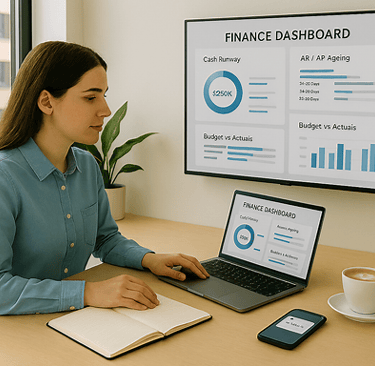
Define must-have KPIs: Cash runway, operating cash flow, AR ageing, AP due within 7–14 days, revenue vs budget, gross margin, and expense variance.
Tailor views by role: CEO dashboard (cash, sales, margin), Operations (WIP/project burn, supplier timing), Finance (variance, compliance status).
Automate reporting: Schedule weekly snapshot emails and monthly board packs; standardise commentary fields to capture insights, not just numbers.
Real-time alerts: Trigger notifications for low cash thresholds, overdue invoices beyond set days, large unapproved bills, or budget over-runs.
Drill-through clarity: Ensure charts link directly to underlying transactions and documents to accelerate investigation and resolution.
Strategy 3: Connect your ecosystem for end-to-end visibility
Receivables and payments: Integrate payment gateways (card, direct debit) with invoice links to speed cash collection and update ledgers instantly.
Expenses and OCR: Use tools that scan receipts, extract data, and push coded transactions straight into your accounts with attachments.
Approvals and controls: Implement structured approval workflows for bills, purchase orders, and expense claims to balance speed with governance.
Payroll and compliance (AU): Ensure Single Touch Payroll (Phase 2), superannuation, and leave accruals sync reliably; align with BAS/GST reporting.
Inventory and jobs: Connect inventory, POS, or job costing/project tools so stock movements and WIP update margins and cash flow in real time.
Implementation checklist
Platform:
Confirm platform selection and subscription tier;
Map chart of accounts and tracking categories (departments, programs, projects).
Connectivity:
Link all bank/credit accounts;
Configure bank rules and auto-match logic.
Dashboards:
Build role-based KPI views;
Set alert thresholds and reporting schedules.
Integrations:
Connect payments, OCR expenses, approvals, payroll, and (if relevant) inventory/CRM.
Controls:
Set user roles/2FA;
Document approval matrices;
Enable audit logs and document attachments.
Testing:
Run parallel period (2–4 weeks);
Validate data flows;
Train team and capture SOPs.
Next steps
Map needs: Document your top KPIs, compliance requirements, and integration priorities this week.
Pilot stack: Trial your chosen platform with live bank feeds and one or two critical integrations within 7–10 days.
Operationalise: Build dashboards, alerts, and SOPs; complete a 30-day parallel run, then switch fully with a post-go-live review at day 45.
Useful AI prompts
Categorisation rules: “Propose robust bank rules to auto-code recurring transactions in [platform] with edge cases covered.”
Dashboard design: “Design three role-specific dashboards (CEO, Operations, Finance) using these KPIs and thresholds: [list].”
Variance insight: “Analyse last month’s budget vs actuals and draft commentary on the top five drivers and corrective actions.”
Cash forecasting: “Create a 13-week cash flow model using AR/AP timings and suggest levers to extend runway by 20%.”
SOP drafting: “Write an SOP for month-end close in [platform], including reconciliations, approvals, and reporting deadlines.”
About Mission Command Business
Mission Command Business equips small enterprises with strategic frameworks and operational tools. From financial management and business direction & support, to people & workplace management, and systems & processes, we help you unlock sustainable growth and lasting impact.